
完全免费!小白都能看懂的 openclaw 安装教程(整套方案日常运行,不花费任何费用)
前言
虽说是小白都会的教程,但是仍然需要我的读者熟练掌握如下技能:
会开机关机 Windows
会操作键盘和鼠标
有汉字和少许英文的基本阅读能力
知道如何打开 Windows 的命令行终端
具备多模态识别能力(说人话:能看懂我的截图在说什么)
看得懂我的笑话和梗图
废话不多说,直接开搞。AI时代的博客会发生巨大的不同。从下面第一步操作开始就是。
教程
第一步. 安装你的万能助手 qwen 或者 claude code
这是一个本地的AI助手,可以通过比你聪明1万倍的方法操作本地的终端1秒钟写出1万行你看不懂的代码来快速调度你计算机的资源。有了它,你就再也不用担心网上那些大佬贴出来的的代码为什么在你的本地报运行之后会出现1万个报错。这些AI助手都会帮你自动解决。
目前主流的可以跑在终端上的助手有 qwen,claude code,codex 和 opencode,中间要两个要收费,旁边两个部分免费。
因为 qwen 每天有2000次免费的使用次数,所以我优先说如何安装 qwen。
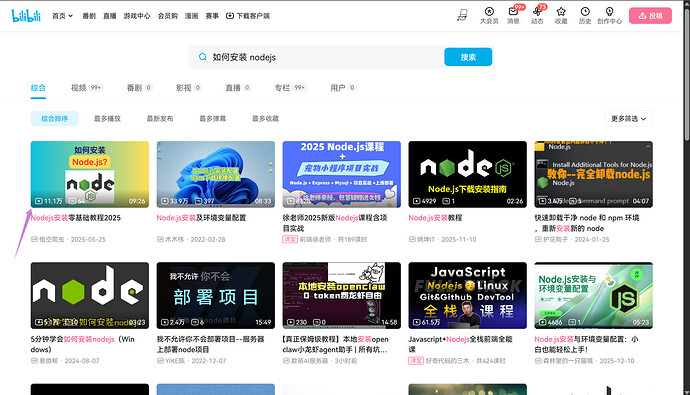
为了让 qwen 这样的AI助手可以运行,我们首先需要安装基础的编程环境 nodejs,自己去 B站 上搜【如何安装 NodeJS】即可,你随便找个高赞的点进去安装就完事。注意,我们一定要安装 node22 或者 node24(不要安装别的版本!!!):
相信你在安装的过程中一定知道了如何打开命令行终端对吧?
打开命令行,输入下面的命令安装 qwen
npm install -g @qwen-code/qwen-code@latest
安装完成后,直接按下 qwen 进入助手对话框,然后选择第一个认证方式 Qwen OAuth,按下回车
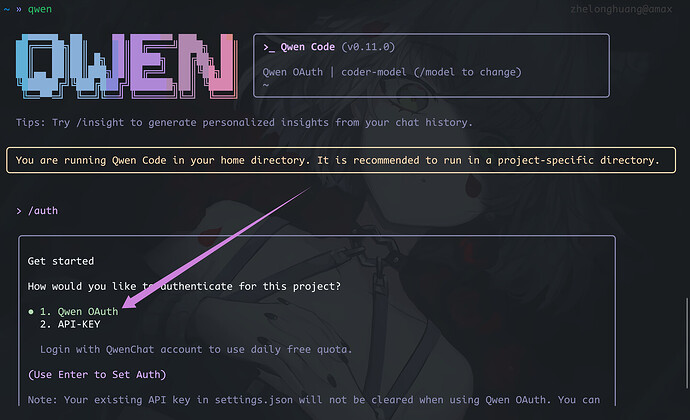
然后会跳出一个链接和一个二维码,将链接扔进浏览器中选择账号进行登录即可(我选的是 github 账号)。
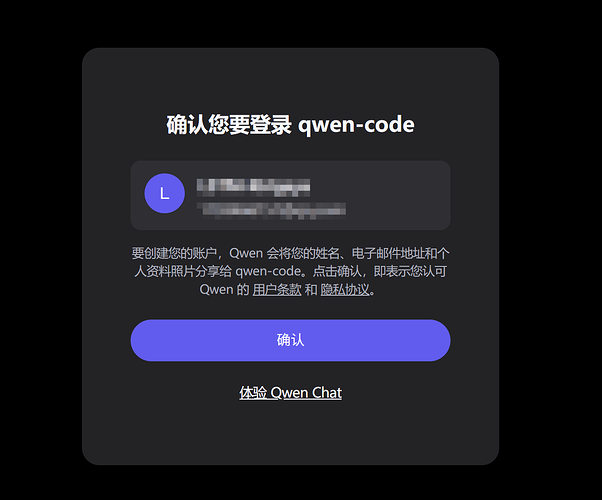
登录完成后回到命令行,qwen 助手就可以使用了。
此时按下 shift + tab,输入框会从蓝色变成红色,意味着 YOLO 模式被激活(全自动执行模式,完全不需要你操心)
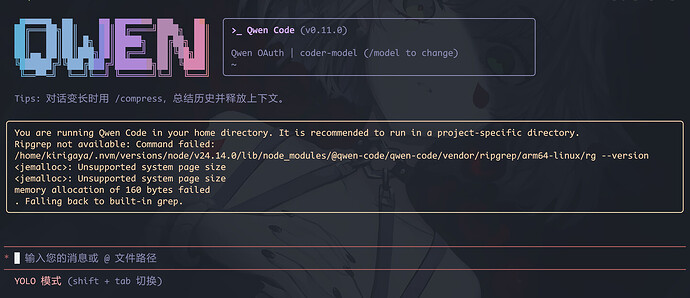
如果你已经成功完成了第一步,那么恭喜你,游戏已经结束了。
第二步: 安装 cmake
在 qwen 里面输入
【请帮我安装 cmake 并暴露到当前的环境变量中,并帮我验证】
然后按下回车。
第三步. 安装 openclaw
在 qwen 里面输入
【阅读 https://openclaw.ai/ 后,帮我使用 npm 全局安装 openclaw,并帮我验证】
然后按下回车。
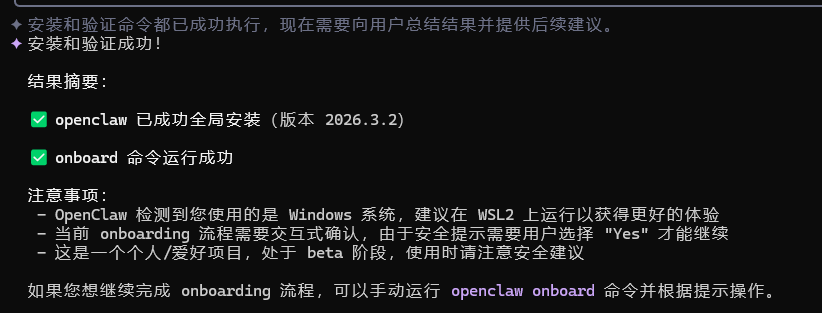
第四步: 配置 openclaw
好,openclaw 安装完成。
后面就是配置 openclaw 了,在命令行输入
openclaw onboard
等待一会儿进入 openclaw 配置页面
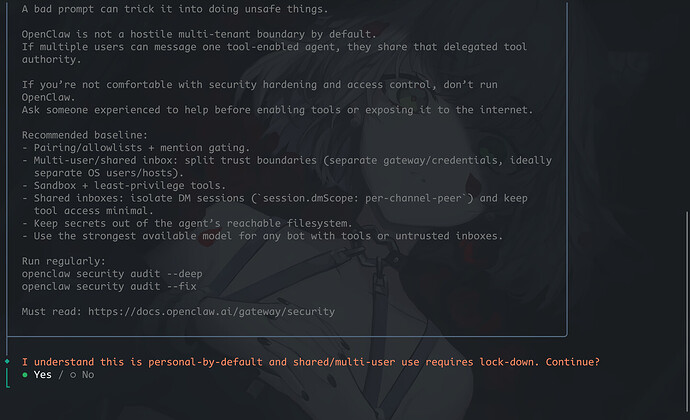
选择 Yes, QuickStart, Qwen(你也可以选择别的模型,qwen 单纯配置容易),然后按下回车。
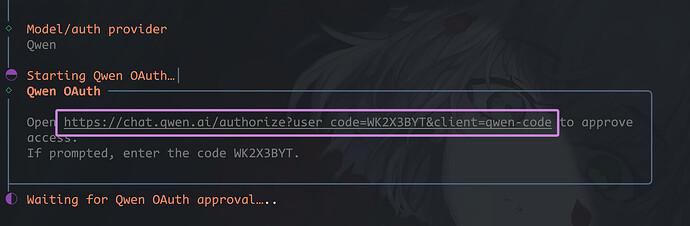
还是一样,进入上面链接进行认证,然后,还是和上面一样的操作,完成登录认证。
然后选 Keep current
然后选择社交媒体,国内用户选择 Feishu/Lark (飞书)
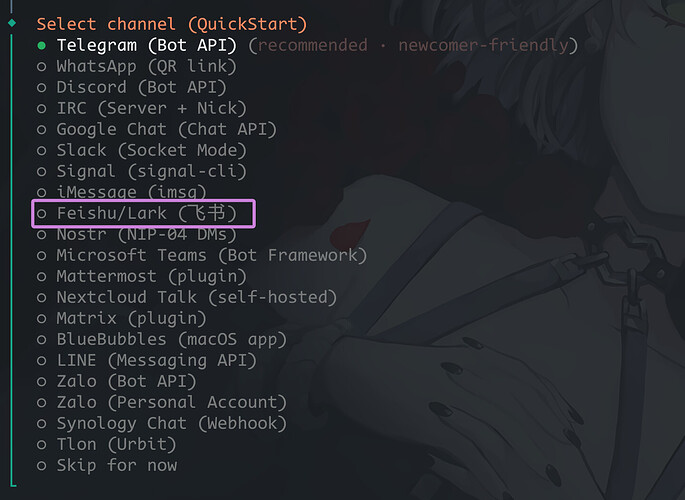
如果想要支持更多的中国大陆使用的社交平台,比如说QQ企业微信、钉钉,可以看这个项:https://github.com/BytePioneer-AI/openclaw-china
后面一路选择默认的回车,直到遇到下面这个:
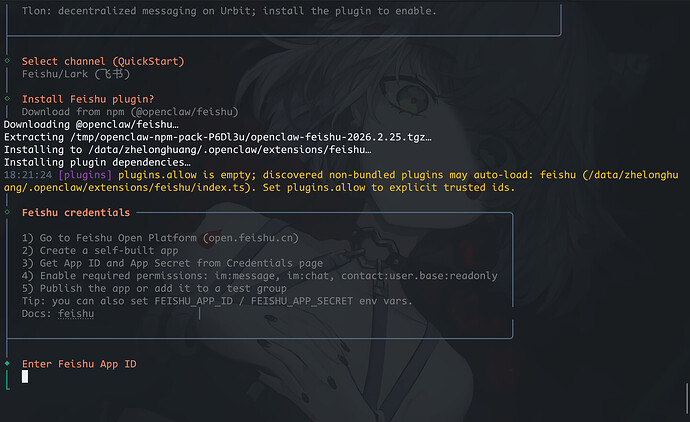
接下来我们就需要依靠飞书的强大平台能力了。
你首先需要先下载并创建对应的飞书账号,然后创建组织,这一套都是基本流程了。不懂的朋友请自行查看飞书的基本使用方法。
完成上面的一系列操作之后,让你的客户端和浏览器的飞书各个应用都登录你当前的组织和账号,点击 飞书开放平台 进入飞书开发者平台。点击右上角的开发者后台。选择机器人
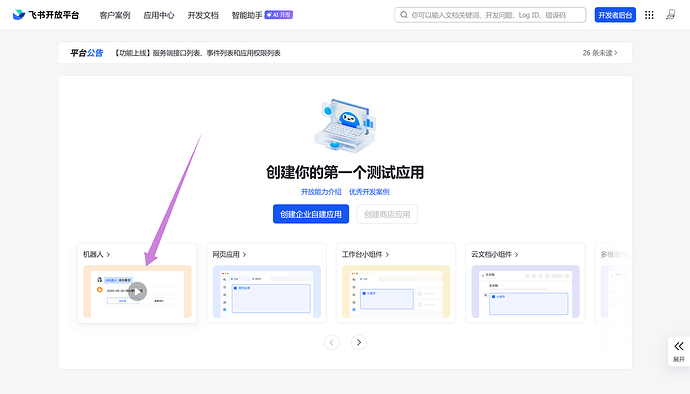
简单配置一下介绍和头像.
然后点击【权限管理】->【批量导入/导出权限】
会弹出一个导入窗口
把里面的内容全部删除,然后把下面的这一坨东西复制后粘贴进去:
{
  "scopes": {
    "tenant": [
      "aily:file:read",
      "aily:file:write",
      "application:application.app_message_stats.overview:readonly",
      "application:application:self_manage",
      "application:bot.menu:write",
      "base:app:copy",
      "base:app:create",
      "base:app:read",
      "base:app:update",
      "base:collaborator:create",
      "base:collaborator:delete",
      "base:collaborator:read",
      "base:dashboard:copy",
      "base:dashboard:read",
      "base:field:create",
      "base:field:delete",
      "base:field:read",
      "base:field:update",
      "base:form:read",
      "base:form:update",
      "base:record:create",
      "base:record:delete",
      "base:record:read",
      "base:record:retrieve",
      "base:record:update",
      "base:role:create",
      "base:role:delete",
      "base:role:read",
      "base:role:update",
      "base:table:create",
      "base:table:delete",
      "base:table:read",
      "base:table:update",
      "base:view:read",
      "base:view:write_only",
      "base:workflow:read",
      "base:workflow:write",
      "bitable:app",
      "bitable:app:readonly",
      "calendar:room:readonly",
      "contact:user.assign_info:read",
      "contact:user.base:readonly",
      "contact:user.department:readonly",
      "contact:user.dotted_line_leader_info.read",
      "contact:user.email:readonly",
      "contact:user.employee:readonly",
      "contact:user.employee_id:readonly",
      "contact:user.employee_number:read",
      "contact:user.gender:readonly",
      "contact:user.id:readonly",
      "contact:user.job_family:readonly",
      "contact:user.job_level:readonly",
      "contact:user.phone:readonly",
      "contact:user.subscription_ids:write",
      "contact:user.user_geo",
      "corehr:file:download",
      "docs:doc",
      "docs:doc:readonly",
      "docs:document.comment:create",
      "docs:document.comment:read",
      "docs:document.comment:update",
      "docs:document.comment:write_only",
      "docs:document.content:read",
      "docs:document.media:download",
      "docs:document.media:upload",
      "docs:document.subscription",
      "docs:document.subscription:read",
      "docs:document:copy",
      "docs:document:export",
      "docs:document:import",
      "event:ip_list",
      "im:app_feed_card:write",
      "im:biz_entity_tag_relation:read",
      "im:biz_entity_tag_relation:write",
      "im:chat",
      "im:chat.access_event.bot_p2p_chat:read",
      "im:chat.announcement:read",
      "im:chat.announcement:write_only",
      "im:chat.chat_pins:read",
      "im:chat.chat_pins:write_only",
      "im:chat.collab_plugins:read",
      "im:chat.collab_plugins:write_only",
      "im:chat.managers:write_only",
      "im:chat.members:bot_access",
      "im:chat.members:read",
      "im:chat.members:write_only",
      "im:chat.menu_tree:read",
      "im:chat.menu_tree:write_only",
      "im:chat.moderation:read",
      "im:chat.tabs:read",
      "im:chat.tabs:write_only",
      "im:chat.top_notice:write_only",
      "im:chat.widgets:read",
      "im:chat.widgets:write_only",
      "im:chat:create",
      "im:chat:delete",
      "im:chat:moderation:write_only",
      "im:chat:operate_as_owner",
      "im:chat:read",
      "im:chat:readonly",
      "im:chat:update",
      "im:datasync.feed_card.time_sensitive:write",
      "im:message",
      "im:message.group_at_msg:readonly",
      "im:message.group_msg",
      "im:message.p2p_msg:readonly",
      "im:message.pins:read",
      "im:message.pins:write_only",
      "im:message.reactions:read",
      "im:message.reactions:write_only",
      "im:message.urgent",
      "im:message.urgent.status:write",
      "im:message.urgent:phone",
      "im:message.urgent:sms",
      "im:message:readonly",
      "im:message:recall",
      "im:message:send_as_bot",
      "im:message:send_multi_depts",
      "im:message:send_multi_users",
      "im:message:send_sys_msg",
      "im:message:update",
      "im:resource",
      "im:tag:read",
      "im:tag:write",
      "im:url_preview.update",
      "im:user_agent:read",
      "vc:meeting.all_meeting:readonly",
      "vc:meeting:readonly"
    ],
    "user": [
      "aily:file:read",
      "aily:file:write",
      "base:app:copy",
      "base:app:create",
      "base:app:read",
      "base:app:update",
      "bitable:app",
      "bitable:app:readonly",
      "contact:user.assign_info:read",
      "contact:user.base:readonly",
      "contact:user.department:readonly",
      "contact:user.department_path:readonly",
      "contact:user.dotted_line_leader_info.read",
      "contact:user.email:readonly",
      "contact:user.employee:readonly",
      "contact:user.employee_id:readonly",
      "contact:user.employee_number:read",
      "contact:user.gender:readonly",
      "contact:user.id:readonly",
      "contact:user.job_family:readonly",
      "contact:user.job_level:readonly",
      "contact:user.phone:readonly",
      "contact:user.subscription_ids:write",
      "contact:user.user_geo",
      "contact:user:search",
      "docs:doc",
      "docs:doc:readonly",
      "docs:document.comment:create",
      "docs:document.comment:read",
      "docs:document.comment:update",
      "docs:document.comment:write_only",
      "docs:document.content:read",
      "docs:document.media:download",
      "docs:document.media:upload",
      "docs:document.subscription",
      "docs:document.subscription:read",
      "docs:document:copy",
      "docs:document:export",
      "docs:document:import",
      "im:chat",
      "im:chat.access_event.bot_p2p_chat:read",
      "im:chat.announcement:read",
      "im:chat.announcement:write_only",
      "im:chat.chat_pins:read",
      "im:chat.chat_pins:write_only",
      "im:chat.collab_plugins:read",
      "im:chat.collab_plugins:write_only",
      "im:chat.managers:write_only",
      "im:chat.members:read",
      "im:chat.members:write_only",
      "im:chat.moderation:read",
      "im:chat.tabs:read",
      "im:chat.tabs:write_only",
      "im:chat.top_notice:write_only",
      "im:chat:delete",
      "im:chat:moderation:write_only",
      "im:chat:read",
      "im:chat:readonly",
      "im:chat:update",
      "im:message",
      "im:message.pins:read",
      "im:message.pins:write_only",
      "im:message.reactions:read",
      "im:message.reactions:write_only",
      "im:message.urgent.status:write",
      "im:message:readonly",
      "im:message:recall",
      "im:message:update"
    ]
  }
}
然后一路点击申请或者确认。
然后点击创建版本, 一路滚到最下面点击保存,然后点击申请审批,然后让组织的管理员审批一下,然后我们在飞书创建一个群聊, 点击设置, 点击群机器人, 添加我们刚刚创建的机器人, ok,完成后,我们回到开发者平台,点击【凭证与基础信息】, 右侧有一个 AppID 和 App Secret,分别复制并按照要求粘贴到 openclaw 的配置页面:后续分别选择 Feishu (feishu.cn) - China 和 Open - respond in all groups (requires mention)
加油,就快完成了!
只差临门一脚,openclaw 本质是一个大模型的网关,其本身并不具备任何的Agent 的能力。所以我们还需要为它配置一些基础的技能包,让它可以执行更加复杂的操作。
所以下一个选择 yes,然后可以自由配置一些技能组,下面分享一下我自己配置的:
himalaya:让AI可以自由的管理你的邮箱。
mcporter:让AI可以自由快速MCP服务器,你只需要简单理解为可以给 AI 外挂更加强大的功能。理论上可以接管任何通过电脑接管到的虚拟世界和物理世界。
nano-pdf:让AI可以阅读你上传的PDF文件。
summarize:让AI可以总结你分享在群聊中的网页,本地文件或者是一些社交媒体。
然后一路回车即可。
这几个国外的服务可以暂时全部选择 No,需要的时候,后面再回来配置就行。
现在配置完成了。
然后按两次 Ctrl C 退出对话框,重启 openclaw:
openclaw gateway restart
进入飞书开发者平台,我们还需要为 AI 创建接受和发送消息的信道,点击【事件与回调】,点击订阅方式右侧的笔按钮,选择长连接,点击保存,然后点击添加事件按钮,找到并勾选接收消息, 然后再次发布这个版本就好了。